Here's a mistake almost everyone makes once: you pick the cheapest SMS route, send a few thousand messages, and only find out later that half of them never arrived, or arrived from a random number instead of your sender ID. Routes to the same country can behave very differently. Some keep your sender name, some replace it, and some get filtered by one operator but not another.
The route tester fixes that guessing game. It sends one short message over each route you pick, to your own phone, so you see with your own eyes which routes deliver and how.
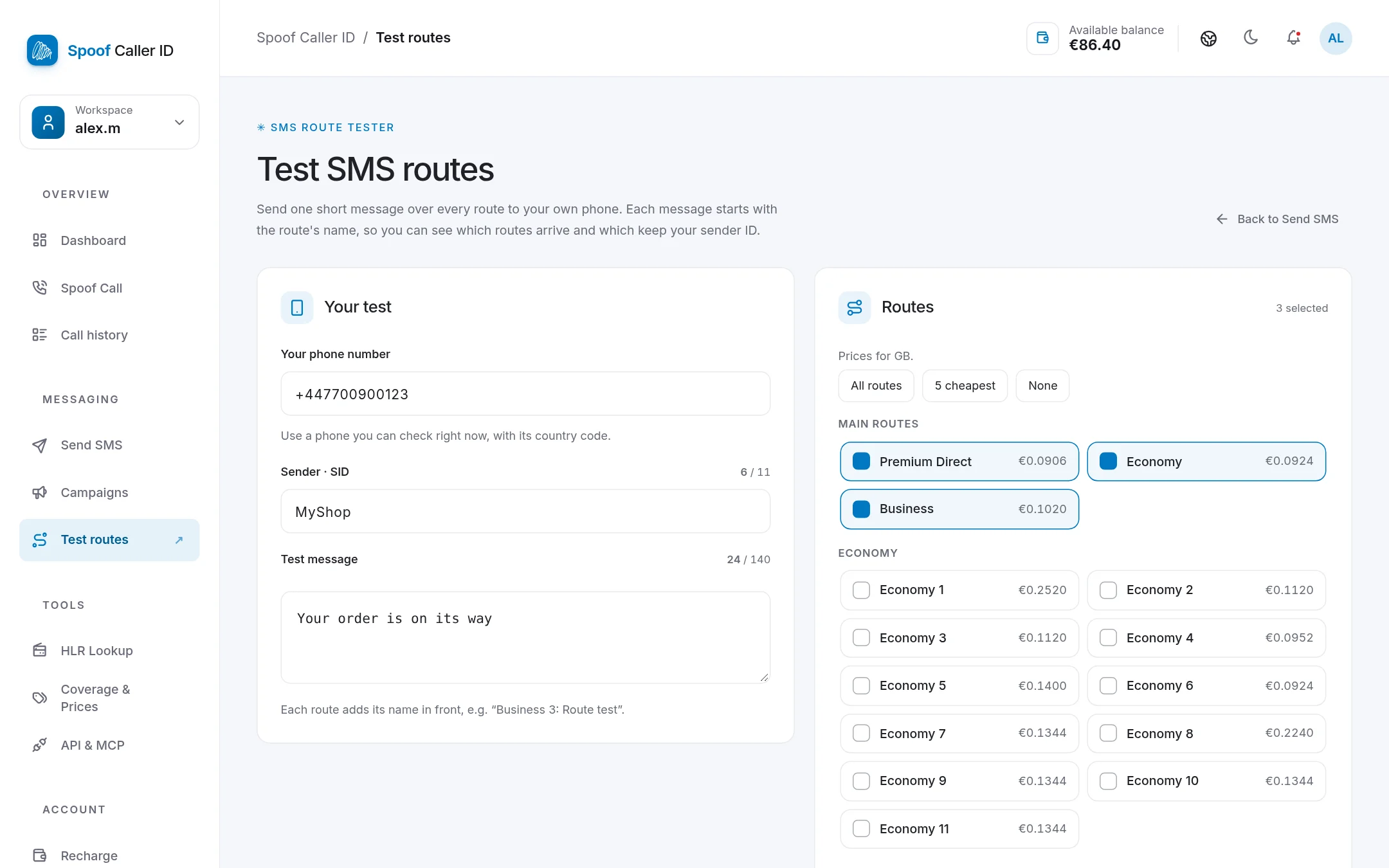
How the route tester works
Every test message starts with the name of the route that sent it, for example "Business 3: Your order is on its way". When the texts land on your phone, you can tell at a glance:
- which routes delivered at all,
- which ones kept your sender ID (in the screenshot above, MyShop),
- how fast each one arrived.
Step by step
- Go to Send SMS → Test routes, or open the route tester directly.
- Enter your phone number with its country code. Use a phone that's in your hand right now. Each route's price for that country appears next to it.
- Type the sender ID you plan to use in the real campaign (up to 11 characters).
- Write a test message. Make it look like your real one, because filters read the content too.
- Pick your routes: All routes, the 5 cheapest, or tick them one by one. The main routes are at the top; more routes and direct channels for specific countries are listed below them.
- Press Send test. The total shown is the most you'll pay.
Reading the results
Each test appears under Your route tests with what the network reported: Sent, Delivered, Not delivered or Refused. Refused messages aren't charged.
Then look at your phone and mark each test Arrived or Didn't arrive. That's the part that matters, because a "delivered" report from a network and a message actually on your screen aren't always the same thing.
What does a route test cost?
Each route is charged at its own normal SMS price, and only if the message is actually sent. Testing ten routes to the UK costs roughly the same as sending ten single texts, which is next to nothing compared with a campaign that goes out on a bad route.
Tips from experience
- Test with your real sender ID and a realistic text. A test that says "test" tells you little about how a promo with a link will do.
- If your campaign has a link, put one in the test. Some operators are strict about links, especially shortened ones.
- Test on more than one network if you can. A route can work fine on one operator and be filtered on another in the same country. A friend's phone on a different network is useful here.
- Retest every few weeks. Operators change their filters without telling anyone.
- Clean your list first. An HLR lookup removes dead numbers before you pay to message them.
If you want to understand why routes behave so differently, our guides on SID vs LLC vs short code and country and operator filtering go into the details.
FAQ
Why did my sender ID change to a number?
That route doesn't support alphanumeric sender IDs in that country, or the operator overrides them. Pick a route that kept your sender ID in the test.
Why does a route show "Delivered" but the message never arrived?
Delivery reports come from the network, and some networks report delivery early. This is exactly why the tester asks you to confirm on your phone.
Can I test routes for any country?
Yes, for any country with SMS coverage. Choose the country, and the page lists every route available for it.
